Complex products. Clear decisions. From ownership to implementation.
01
Classflow
AI school workflows · Founder & Product Builder
Turning everyday school requests into connected workflows with AI.
PRODUCT BUILT
0→1
Working product
IdeaUX / UISoftware
THE PRODUCT IDEA
One request. Connected actions.
Calendar, communication and consent. In development · Product demo.
02
PlayJoob
Project management · Founder & Designer
Turning static project boards into visual maps, missions and team progress.
EARLY TRACTION
200Registered users
€0marketing spend40 initial testers
THE PRODUCT IDEA
Progress you can play.
Visual maps, missions and team progression. Built and tested in working code.
03
lcmd
B2B SaaS · Acting Design Lead
Making complex construction planning consistent across web and mobile.
MEASURED OUTCOME
+40pts
NPS improvement
−30 Before+10 Peak
THE DESIGN FOUNDATION
One system. Web + mobile.
A shared design language for complex construction-planning workflows.
04
hyo
Collaboration · Senior UX/UI
Bringing shared-office presence and everyday conversations into remote work.
CONCEPT DELIVERED
2
Ways to meet.One shared office.
SpontaneousScheduled
THE PRODUCT VISION
A shared virtual office.
Spontaneous and scheduled video calls.
05
YourWork
Recruiting · Creative Director
Adapting short-form video to finding and publishing job opportunities.
CONCEPT + TESTING
3
Core product flows.Selected features tested.
01Create→02Discover→03Find nearby
THE PRODUCT CONCEPT
Discover work. Through video.
Job search and publishing based on TikTok mechanics.
06
Feil, Feil & Feil
Construction · Senior UX/UI
Making time tracking and route documentation usable for field teams.
CLIENT DESIGN DELIVERY
2
Field-work contexts.Client designs delivered.
Time trackingRoute documentation
THE DESIGN APPROACH
Real work. Focused tools.
Time tracking and route documentation. Designed for different field teams.
😍
Employer Feedback
Greg combined strong product ownership with precise execution and effective
solutions to complex problems. His work contributed to improved product
perception and user satisfaction, including an NPS increase from −30 to a peak of +10.
Adapted employer summary · Not a verbatim quotation
Greg consistently delivered excellent results and showed exceptional initiative.
He introduced innovations into the design team's workflows, significantly
improving collaboration within the team and across other teams.
Adapted employer summary · Not a verbatim quotation
HOW I HELP PRODUCT TEAMS
01
COMPLEX B2B PRODUCTS
Turn dense workflows, business rules and enterprise requirements into clear product experiences.
02
AI-ENABLED WORKFLOWS
Make AI capabilities understandable, with clear human review, decisions and control.
03
PRODUCT DIRECTION & 0→1
Move from unclear requirements and early ideas to product concepts that can be tested.
04
DESIGN SYSTEMS & DELIVERY QUALITY
Build scalable design foundations and close the gap between design and implementation.
DESIGNING WITH AI
I use AI not just to generate ideas, but to shorten the distance between design and working software.
FROM IDEA TO WORKING SOFTWARE
05/ 05
01
Concept
Define the problem. Choose a direction.
02
Prototype
Make the idea tangible. Try the interaction.
03
Product Logic
Connect flows, states and edge cases.
04
Implementation
Turn the design into working software.
05
Design QA
Check the details. Refine the experience.
Review, refine, repeat.
AI-assisted throughout.Human judgement at every step.
✦●♥✿
ABOUT ME
I’m Greg — Grigory Neupokoev. A Product Design Lead and AI Product Builder
based in Stuttgart. I turn complex product problems into clear experiences
and working software.
At LCM Digital (2022–2026), I led web and mobile redesigns as Acting Design Lead,
guided a junior designer and developed the design system. I stayed involved
through usability validation, design reviews and Design QA.
Over more than a decade in digital design, I’ve worked across B2B platforms,
mobile apps and design systems. I like owning the whole journey: understanding
the problem, challenging assumptions and staying involved until a solution works.
Today, I also build products with AI-assisted development. One is
Classflow,
an AI-first platform I’m developing to automate everyday school processes.
It connects planning, communication and parent responses — turning an ordinary
request into a connected workflow, with people still in control.
Explore the case study ↗
A freelance project, a full-time role, or an interesting product challenge? Let’s talk.
gregneu.de@gmail.com
AI school workflows · Independent product
Classflow
ROLE
Founder, Product Designer & AI Product Builder
SCOPE
Product direction · UX/UI · Implementation
STATUS
In development · Pre-pilot
Context
Classflow is an AI-first school platform I’m building to connect everyday planning, communication and parent responses. The idea grew out of my experience as a parent representative and school conference member.
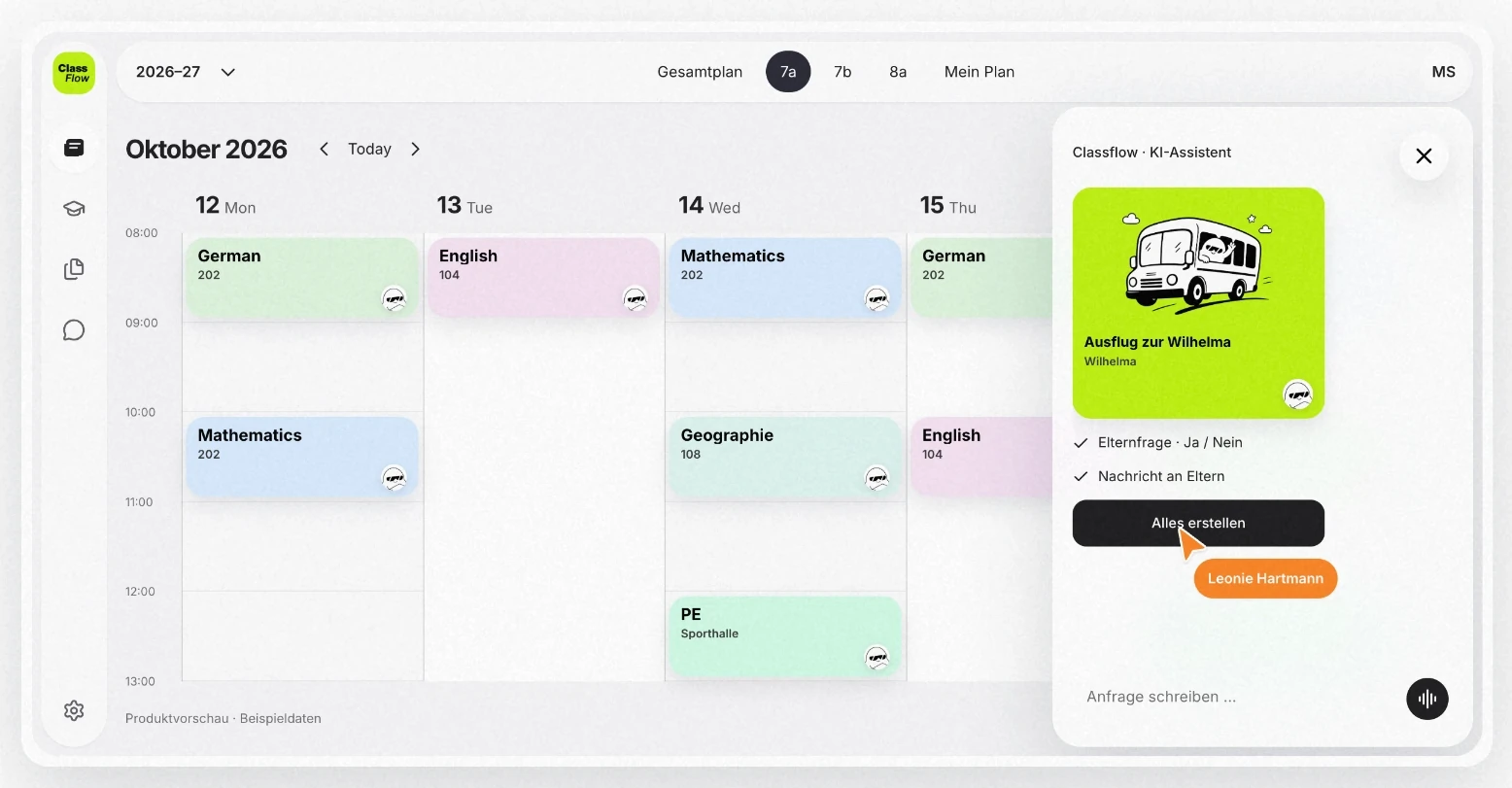
One request. A connected school workflow.Product demonstration · October 2026 · Fictional school data.
Problem
A school trip is not just a date in a calendar. Someone needs to inform the right families, ask for permission, collect responses and follow up. I saw how much coordination sits between those tasks — even when the initial request is simple.
Constraints
Teachers, parents and students have different responsibilities. Automation needs to respect those boundaries and make the difference between a proposed action and a completed action clear. A natural-language interface should reduce admin, not make people guess what happened.
01 / WORKFLOW MODEL
From a request to connected actions.
01DescribeA teacher starts with a request.
02ReviewProposed actions stay visible.
03CoordinateThe event and family communication connect.
04Follow throughResponses stay with the event.
Workflow model · Product demonstration.
My Role
I own the product direction, information architecture, UX/UI and AI-assisted implementation. I work across the calendar, event structure, assistant and family-facing mobile flows — taking ideas beyond static designs into working software that I can test and refine.
Key Decisions
Keep the assistant beside the work
The calendar remains the main workspace. The assistant sits next to it, so a teacher can describe a task without losing the timetable or context.
Make the event the shared place to work
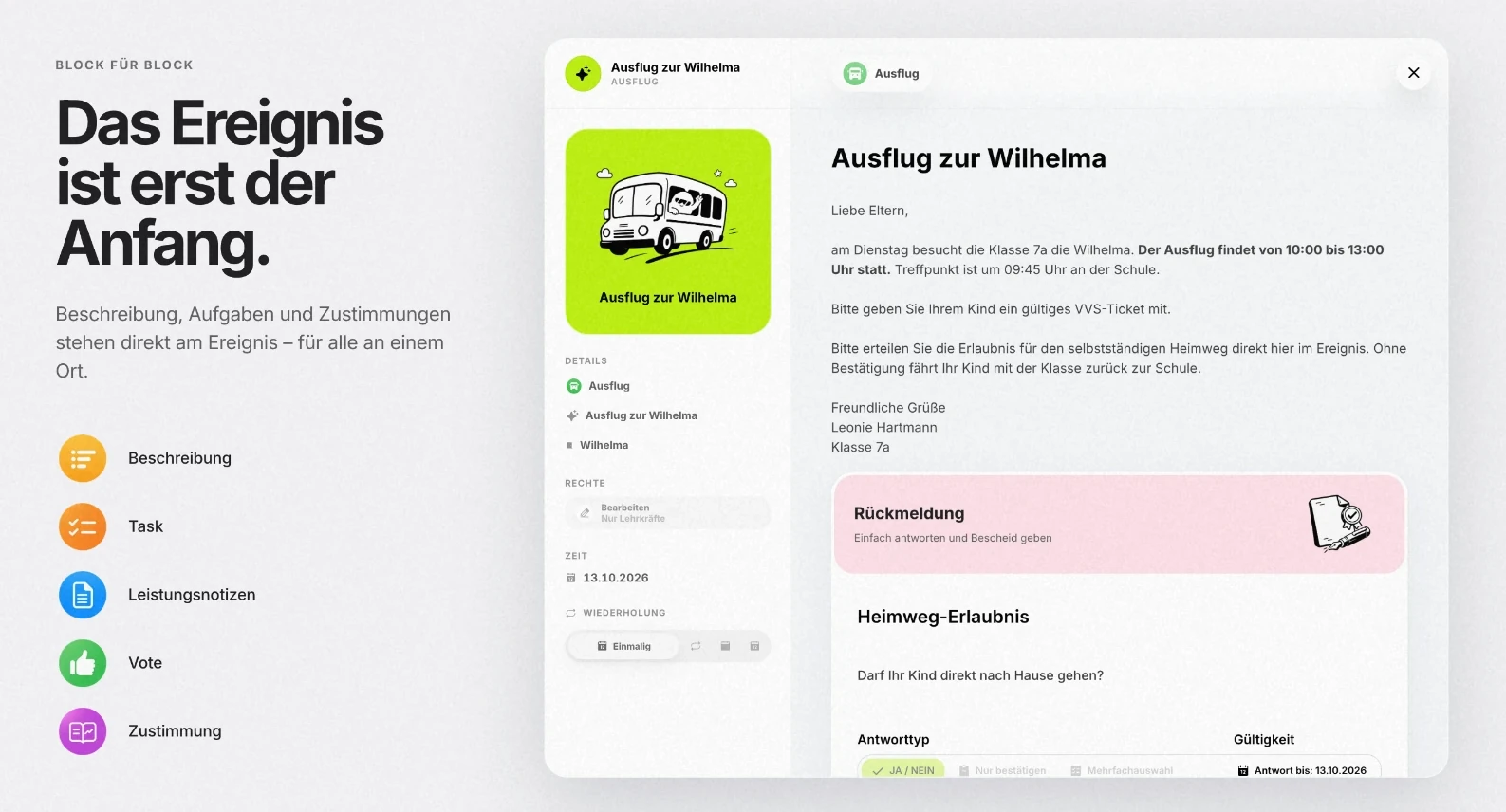
Trip details, parent requests and responses belong to the same event. The design connects these objects instead of sending people between unrelated tools.
Make proposed actions visible
I designed a review step around the event and related actions. The key question is whether people understand what the assistant is about to create or send, before they approve it.
Design beyond the teacher’s screen
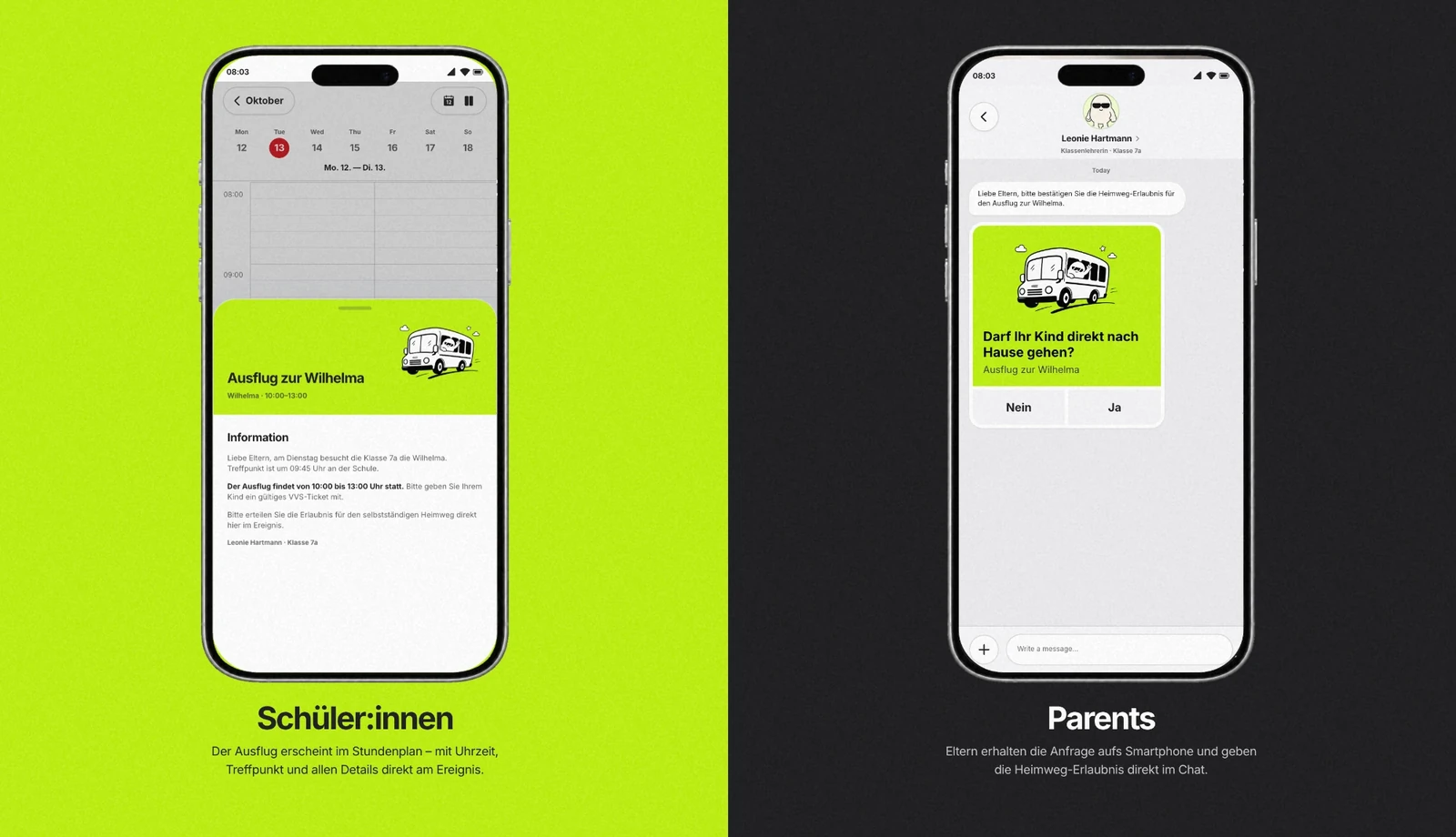
The journey continues on mobile: students need the details, parents need a clear request, and the school needs to see the response in context.
02 / ROLE MODEL
Shared context. Different responsibilities.
SHARED OBJECTThe school trip
Details, requests and responses.
Teacher
Plans the event and reviews the assistant’s proposal.
Student
Sees the trip details in the mobile experience.
Parent
Receives a focused request and sends a response.
Roles share the event context, not the same responsibilities or access.
Solution
A school platform organised around a shared calendar and structured events, with an assistant designed to connect planning, messages, reminders and consent. Text or voice can be a starting point; the familiar interface remains available for reviewing and editing the work.
Current Stage
Working product · Active development
The work shown here is a product demonstration, not a live school deployment. Adoption and time savings have not yet been measured. My next step is to validate the workflows with school teams, including whether they can confidently review the assistant’s actions.
03 / CURRENT STAGE
Built. Now ready to learn.
0→1
Idea to working product
STARTSchool coordination problem
CURRENT · PRE-PILOTWorking product
NEXTValidate with school teams
Adoption and time savings have not yet been measured.
THE SCHOOL-TRIP SCENARIO
A small request. A lot less switching.
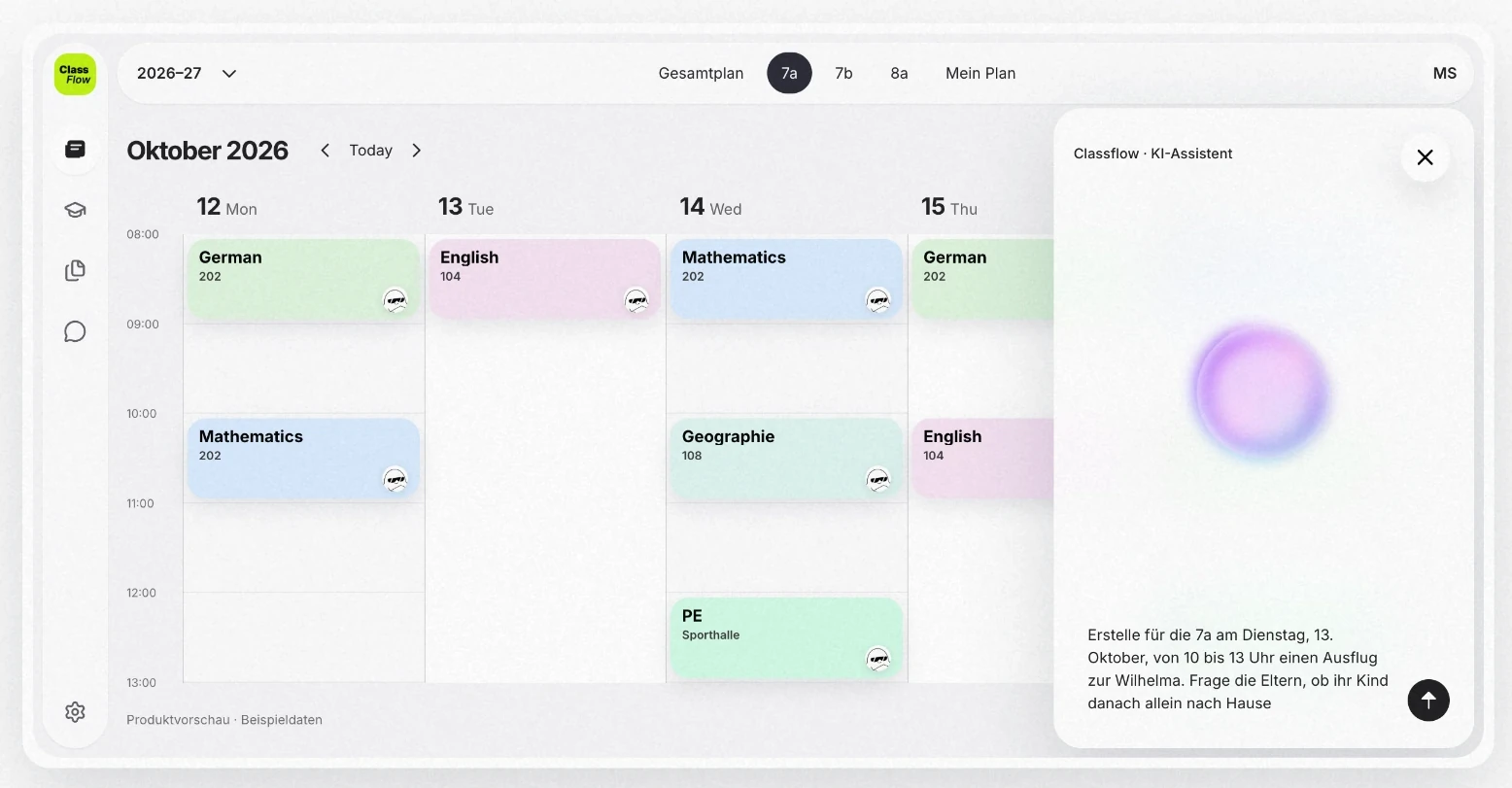
“We’re taking class 7a to Wilhelma. Ask parents whether their children can go home on their own afterwards.”
01
Understand
Connect the request to the class and the trip.
02
Review
Show the proposed event and parent request.
03
Coordinate
Keep the calendar and family communication together.
04
Follow through
Bring the response and its record back to the event.
The designed workflow below is illustrated with product-demo screens.
Toolset
Figma
Codex
Supabase
AI-assisted development
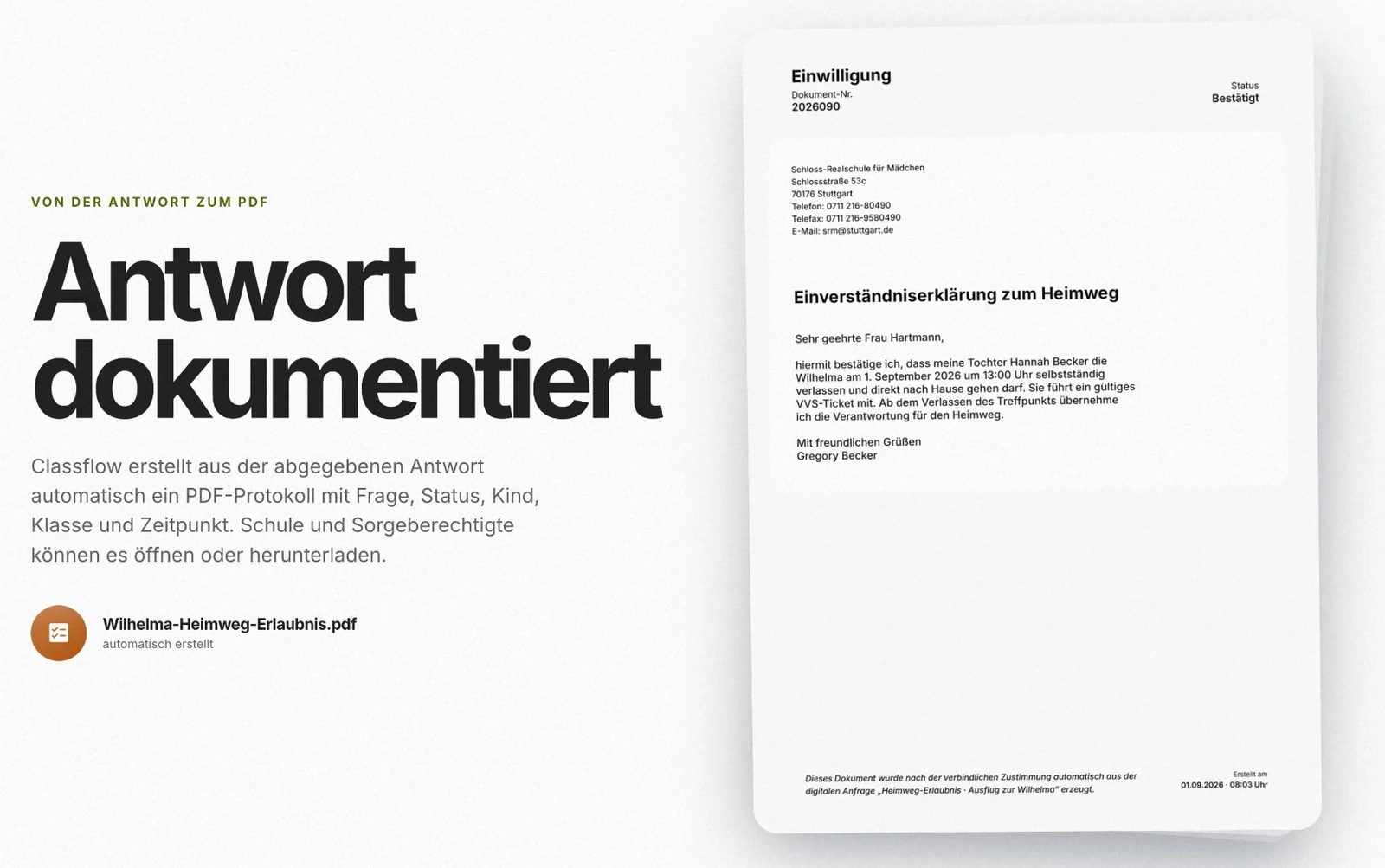
Start with the request, not a formThe assistant stays beside the calendar. The teacher can describe the task while keeping the timetable in view.The event is more than a time slotTrip information and the parent request are part of the same object, rather than separate administrative tasks.One process. Different responsibilities.Students see the trip. Parents receive a focused request. The design carries the same context across roles and devices.A response that can be traced backThe demonstration shows a document linked to the parent’s answer, completing the journey from planning to response.
Project management · Founder & Designer
PlayJoob
ROLE
Founder & Product Designer
PERIOD
Jul. 2025 – Present
Context
PlayJoob is a gamified project-management platform I am building from scratch, with visual maps, missions and team progression.
Problem
Project planning needed to feel more motivating and make team progress visible, rather than revolve only around task transactions.
Constraints
The game-like experience still needed the structure and usability of a practical planning tool for real teams.
01 / PRODUCT MODEL
Make progress part of the interface.
Visual maps
See the project as a shared space.
Missions
Keep planning connected to the work.
Team progression
Make progress visible to the team.
Product-model illustration · Maps, missions and team progression.
My Role
As Founder and Product Designer, I owned the product concept and UX, built directly in code and recruited users for early testing.
Key Decisions
Make progress part of the interface
Move beyond static boards with visual maps, missions and team progression, while keeping project planning at the centre.
Design in working code
Use an AI-assisted design-to-code workflow instead of relying on static mockups, to test real user flows earlier.
02 / BUILDING APPROACH
Design in working software.
01Concept & UXShape the product direction.
02Build in codeUse an AI-assisted workflow.
03Test real flowsBring in early users.
04RefineKeep evolving the experience.
Founder-led product design and implementation.
Solution
A working, game-inspired planning experience that brings project maps, missions and team spaces into one interface.
Impact
200Registered users · €0 marketing spend
I grew PlayJoob to 200 registered users without spending on marketing. An earlier milestone brought 40 users into initial testing.
Press play to load the YouTube player. An internet connection is required.
Local file preview: run start-preview.command to watch inside this case, or use Watch on YouTube.
The product in useA visual project map with missions and team spaces.Game-inspired planningThe original rocket and hexagonal-map visual.
B2B SaaS · Acting Design Lead
lcmd
ROLE
Senior Product Designer (Acting Design Lead)
PERIOD
Jul. 2022 – Jun. 2026
Context
lcmd is a construction-planning product across web and mobile. I led the redesign of its core experience and visual identity.
Problem
Complex planning workflows needed a clearer, more consistent experience across both platforms.
Constraints
Cross-platform consistency, stakeholder alignment and implementation quality had to be addressed together.
01 / SYSTEM MODEL
A shared foundation across surfaces.
SHARED FOUNDATIONDesign system
Consistent patterns. Scalable visual language.
Web
Core construction-planning experience.
Mobile
A consistent cross-platform experience.
Product identity
Logo, visual language and brand colours.
Design-system and identity work developed alongside the product redesign.
My Role
I owned end-to-end product design as Acting Design Lead: discovery, UX/UI, prototyping, validation and implementation support. I partnered with Product Management and Engineering, guided a junior designer and set standards through design reviews.
Key Decisions
Build a shared design foundation
Develop the design system alongside the redesign, giving web and mobile a consistent visual language and scalable foundations.
Stay involved through delivery
Combine usability testing and prototypes with design reviews, Design QA and UI finishing in close collaboration with Engineering.
Connect the product and its identity
Refresh the logo, visual language and brand colour system alongside the product redesign and product communication.
02 / DELIVERY APPROACH
Ownership from discovery to delivery.
01DiscoveryUnderstand the planning workflows.
02UX / UIDefine the product experience.
03PrototypeExplore and make ideas tangible.
04ValidateUse usability testing.
05DeliveryDesign reviews, QA and UI finishing.
Close collaboration with Product Management and Engineering.
Solution
A redesigned cross-platform experience, a scalable design system and a refreshed product identity. AI-assisted concepts and prototypes supported exploration.
Impact
−30 → +10NPS · Peak of +10
Product redesign and continuous optimization contributed to an NPS increase from −30 to a peak of +10.
03 / REPORTED OUTCOME
From negative feedback to a positive peak.
+40
NPS points
Before → reported peak
BEFORE−30
PEAK+10
−1000+100
NPS scale · Two reported values, not a time series
Reported NPS: −30 → peak +10 · Redesign and continuous optimization contributed to the improvement.
Toolset
Figma
Codex
Maze
Higgsfield
Spline
The planning experienceTimeline-based construction planning with tasks and milestones.Built around construction workThe original visual from the lcmd case presentation.
Collaboration · Senior UX/UI
hyo
ROLE
Senior UX / UI Designer
PERIOD
Sep. 2021 – Apr. 2022
Context
hyo was a collaborative-platform concept with gamification, designed to give remote colleagues a sense of being in the same office.
Problem
Translate the product vision into an everyday collaboration experience, not just a collection of video calls.
Constraints
The concept needed to support both spontaneous and scheduled calls, alongside game mechanics for the shared workplace.
01 / SPATIAL CONCEPT
An office, not just a call list.
ROOMS
DESKS
Colleague presence
Rooms & desks
Make the shared workplace tangible.
Colleague presence
See the people within the spatial office concept.
Concept illustration · Rooms, desks and colleague presence.
My Role
As Senior UX/UI Designer, I was responsible for the UX/UI concept of the collaborative platform.
Key Decisions
Represent a shared workplace
The concept uses rooms, desks and colleague presence to make the virtual office tangible.
Support two ways to meet
Bring spontaneous conversations and scheduled video calls into the same collaboration concept.
02 / CONVERSATION MODEL
Two ways to meet. One shared workplace.
SPONTANEOUS
Start a conversation
Support the unplanned moments of working together.
Team calls
SCHEDULED
Meet with a plan
Bring scheduled video calls into the same concept.
Interaction model · Spontaneous conversations and scheduled video calls.
Solution
A spatial office interface with rooms and colleague avatars, complemented by a team video-call experience.
Impact
Concept delivery
The product vision took shape as a concrete UX/UI concept for the shared office and video-call experience.
03 / DESIGN OUTPUT
A product vision made tangible.
Concept delivered.
A concrete UX/UI direction for the shared workplace.
Shared office
Spatial interface with rooms and colleague avatars.
Video-call experience
The complementary team-conversation experience.
Design output · UX/UI concept for the office and video-call experience.
Toolset
Figma
Photoshop
Redmine
Miro
Maze
A shared virtual officeRooms, workspaces and colleague presence in one interface.Conversations with the teamThe video-call experience from the presentation.
Recruiting · Creative Director
YourWork
ROLE
Creative Director
PERIOD
Mar. 2021 – Jul. 2021
Context
YourWork was a mobile recruiting product built around short-form video mechanics for job discovery and publishing.
Problem
Turn familiar video interactions into a practical way to search for and publish job offers.
Constraints
The concept needed to address both job discovery and job publishing. Product work ran alongside finding and interviewing new team members.
01 / PRODUCT MODEL
Two sides of the same hiring experience.
JOB DISCOVERY
Find an opportunity
Video-based discovery and location-based search.
Short-form video
JOB PUBLISHING
Share an opportunity
Create and publish job offers in the mobile concept.
Mobile product concept · Discovery and publishing.
My Role
As Creative Director, I owned product conception, business logic and UX/UI development. I also helped find and interview new team members.
Key Decisions
Connect video to a hiring task
Shape the mobile concept around short-form video for discovering and publishing job offers.
Test specific parts of the concept
Use focused user tests to explore individual features and ideas within the product concept.
02 / VALIDATION APPROACH
Explore the feature, then test the idea.
01Feature ideaSelect a specific part of the concept.
02UX / UI conceptMake the interaction tangible.
03User testingExplore individual features and ideas.
Concept validation · Individual features explored through user testing.
Solution
A mobile experience covering job creation, video-based discovery and location-based search, shown in the product screens and demo.
Impact
Product concept & feature testing
Developed the product concept and UX/UI, with individual features and ideas explored through user testing.
03 / DESIGN OUTPUT
A mobile concept across the hiring journey.
Job creation
Publish an offer.
Video discovery
Explore through short-form video.
Location search
Find opportunities by location.
Product conception, business logic and UX/UI · Individual features explored through user testing.
Press play to load the YouTube player. An internet connection is required.
Local file preview: run start-preview.command to watch inside this case, or use Watch on YouTube.
A video-first job platformThe mobile product concept.From discovery to a job offerJob publishing, video content and location-based discovery.
Construction · Senior UX/UI
Feil, Feil & Feil
ROLE
Senior UX / UI Designer
PERIOD
Nov. 2018 – Feb. 2021
Context
At Feil, Feil & Feil, I designed client products with a focus on the construction industry. The work shown covers time tracking and route documentation.
Problem
Make time tracking and documentation intuitive for craftsmen and route drivers, based on each client briefing.
Constraints
Each brief had its own requirements and target users. These are separate client projects, not one combined application.
01 / PROJECT SCOPE
Different people. Different working contexts.
01
Time tracking
Working-time entries for craftsmen.
CLIENT PROJECT
02
Route documentation
Documentation for route drivers.
SEPARATE CLIENT PROJECT
Two separate client projects, each with its own brief.
My Role
As Senior UX/UI Designer, I translated client briefings into product-specific UX and interface designs.
Key Decisions
Organize the working-time entry
The time-tracking design brings calendar selection, recorded hours and breaks into a focused set of screens.
Keep documentation with route context
The route app brings together route details, complaints and notes, reflecting the driver’s tasks.
02 / INFORMATION MODEL
Keep each interface close to the task.
Time tracking
Calendar selection
Recorded hours
Breaks
Route documentation
Route details
Complaints
Notes
Information model · Task-focused screens for each client context.
Solution
Mobile UX/UI concepts for working-time entries and route documentation, tailored to the respective client briefings.
Impact
Client design delivery
Created task-focused interface designs for two field-work contexts: recording working time and documenting routes.
03 / DELIVERY APPROACH
From each brief to a focused mobile design.
01Client briefingUnderstand the specific requirements.
02Product-specific UXTranslate the brief into the right structure.
03Interface designCreate the mobile UX/UI concept.
Client design delivery · Mobile UX/UI concepts tailored to each brief.
Toolset
Sketch
Photoshop
Notion
Flinto
Mobile tools for craftsmenThe original product presentation visual.Time trackingCalendar selection, recorded hours and working-time entries.Route documentationComplaints, route details and notes.